How to Scale Cold Email Outreach Without Burning Domains
Most teams don't lose cold email because of bad copy.
They lose it because they scale too fast.
Cold email outreach often starts well. Replies come in. Meetings get booked. Pipelines grow. Confidence builds.
Then volume increases. Follow-ups stack up. Automation runs nonstop.
Soon after, inbox placement drops. Replies slow down. Domains get flagged.
Cold email outreach still works.
What breaks is sender reputation.
This guide explains how to scale cold email outreach without burning domains by improving inbox placement, protecting sender reputation, and using outbound email automation correctly.
You'll learn:
- Why domains burn when cold email outreach scales
- How inbox providers judge sender reputation
- How to improve email deliverability for cold outreach
- How outbound and sales email automation help (or hurt)
- How strong teams scale safely over time
No hacks. No shortcuts. Just systems that last.
Why Domains Burn When Cold Email Outreach Scales
Domains don't burn overnight.
They burn slowly.
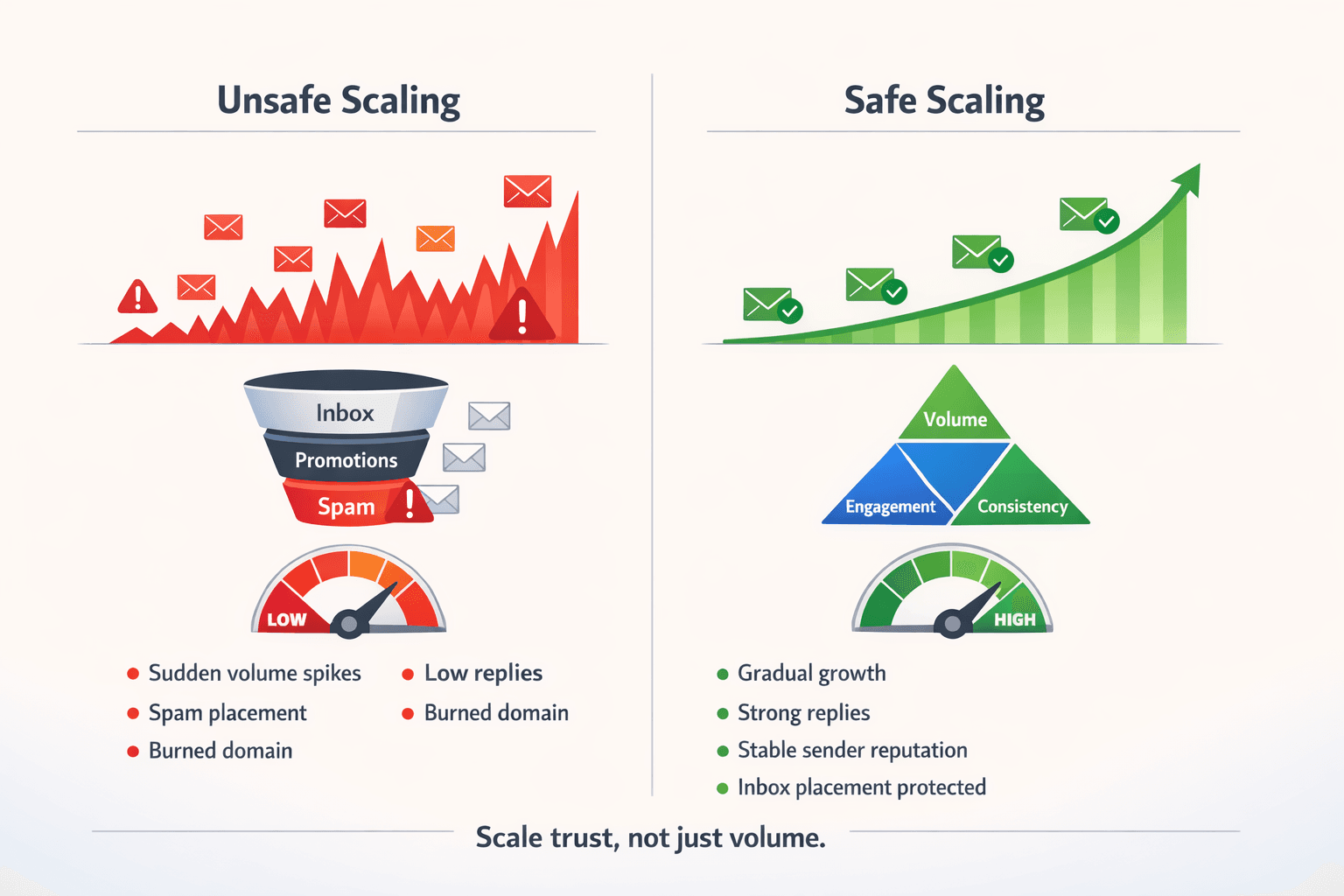
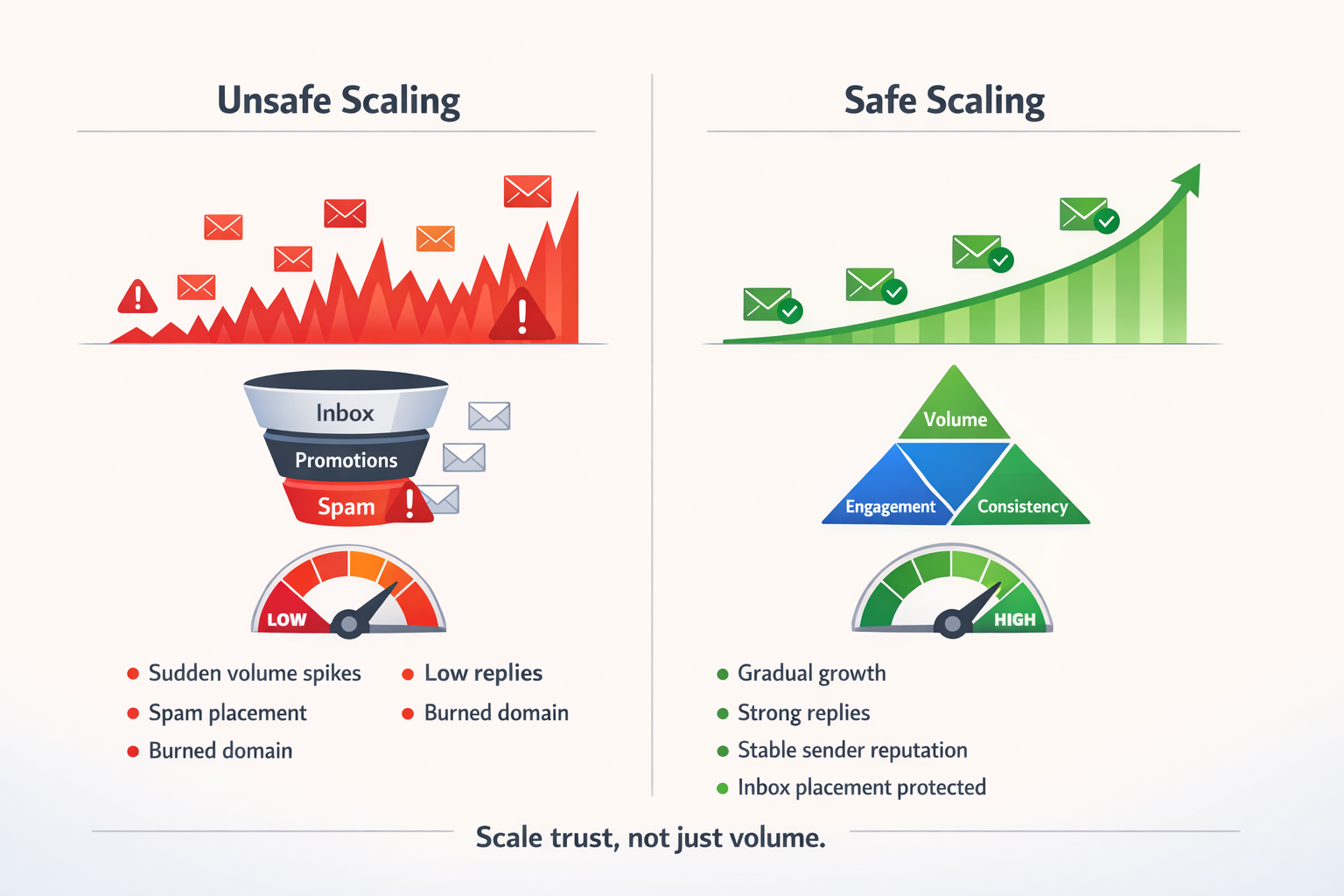
When teams scale cold email outreach too fast, inbox providers start noticing risky patterns:
- Sudden jumps in daily sending volume
- Low replies after emails are opened
- High ignore rates across inboxes
- Too many follow-ups without responses
- Inconsistent sending behavior
Inbox providers don't judge emails one by one.
They judge sender behavior over time.
If your cold email outreach creates more negative signals than positive ones, inbox placement drops — even if your copy is good. This is why scaling outbound email automation without control often damages domains.
How Inbox Providers Judge Sender Reputation
Sender reputation is based on behavior, not intent. Improving deliverability requires more than copy — it requires systems that protect inbox trust.
Inbox providers look at:
- How quickly sending volume increases
- How consistent sending patterns are
- How often recipients reply
- How often emails are ignored or deleted
- Spam complaints
- Domain and inbox stability
Replies are one of the strongest positive signals.
Silence at scale is a warning sign.
This is why improving sender reputation for cold email outreach means focusing on engagement first, not just sending more emails.
If you want a deeper breakdown, we explain this in detail in our guide on sender reputation and inbox placement.
Domain Reputation vs Inbox Reputation (Important Difference)
Many teams confuse these two.
- Inbox reputation belongs to one email inbox
- Domain reputation builds over time across all inboxes
You can replace inboxes quickly.
You cannot easily fix a damaged domain.
If several inboxes under the same domain perform poorly, rotating inboxes won't fix deliverability. Improving email deliverability for cold outreach requires protecting both inbox and domain reputation.
Early Warning Signs Your Domain Is at Risk
Most domain damage is preventable if you act early.
Watch for these signs:
- Open rates dropping across all inboxes
- Replies falling while opens stay the same
- Emails moving from Primary to Promotions or Spam
- Follow-ups performing worse than first-touch emails
- Warm inboxes suddenly losing inbox placement
When these signs appear, scaling should pause. Increasing volume at this point only makes the problem worse.
The Biggest Scaling Mistake: Volume First, Trust Later
Most teams scale cold email outreach like this:
- Start with one inbox
- See replies
- Increase volume fast
- Add more follow-ups
- Rotate inboxes often
- Burn domains
Strong teams scale differently:
- Protect engagement first
- Increase volume slowly
- Add inboxes over time
- Stop emailing low-interest leads
- Keep sender identity consistent
Scaling cold email outreach is a trust-building process, not a race.
What Safe Scaling Actually Means
Safe scaling doesn't mean staying small.
It means growing with control.
Safe cold email outreach scaling includes:
- Slow daily volume increases
- Stable sender and domain identity
- Inbox warmup before and during campaigns
- Engagement-based suppression
- Consistent sending schedules
This is where sales email automation helps — when used the right way.
How Outbound Email Automation Helps (and Hurts)
Outbound email automation isn't the problem.
Uncontrolled automation is.
Used correctly, outbound email automation helps teams:
- Spread volume across inboxes
- Enforce daily sending limits
- Pause campaigns when replies drop
- Keep sending behavior consistent
- Protect sender reputation
Used poorly, automation:
- Sends too many emails too fast
- Creates sudden volume spikes
- Reuses damaged domains
- Hides engagement problems
- Pushes volume instead of controlling it
Automation should act as a guardrail, not a speed booster.
Inbox Warmup Is Required (Not Optional)
Inbox warmup prepares inboxes for real sending behavior.
Warmup helps:
- Build trust slowly
- Teach inbox providers normal behavior
- Keep sender reputation stable
- Reduce spam risk
Warmup should continue during live campaigns, not stop once outreach begins. Using a dedicatedhttps://salestarget.ai/email-outreach/unlimited-inboxes-warmup&ust=1767847320000000&usg=AOvVaw15wrhHaoi7CZ20kDUxbBQI&hl=en-GB"> email warmup system helps maintain inbox health as you scale.
We explain this in detail in our guide on inbox warmup for cold email deliverability.
Volume Guidelines That Protect Inbox Placement
There is no universal "safe number," but patterns matter.
| Stage | Emails per inbox / day |
|---|---|
| New inbox | 10–20 |
| Early scaling | 20–30 |
| Stable inbox | 30–50 |
| Advanced scaling | Add more inboxes |
Best practices:
- Increase by 5–10 emails every few days
- Pause increases if reply rates drop
- Avoid sudden jumps
- Scale by adding inboxes, not pushing one inbox
These guidelines apply regardless of which email outreach tools you use.
Engagement-Based Suppression: A Key Scaling Lever
Strong teams don't chase silent leads.
They:
- Stop emailing prospects who never reply
- Reduce follow-ups when there's no interest
- Protect future inbox placement
Sending fewer emails to the wrong people protects your ability to send more emails to the right ones. This is one of the most ignored ways to improve email deliverability for cold outreach.
Why Consistent Sender Identity Matters
Inbox providers track patterns.
Constantly changing sender names, domains, or email formats creates distrust.
Cold email outreach scales best when:
- Sender names stay consistent
- Domains build history
- Sending behavior stays predictable
Some email outreach tools rotate identities too aggressively, which often hurts deliverability instead of helping it. Controlled inbox rotation helps distribute volume without changing sender identity too aggressively.
What Sales Email Automation Should Do at Scale
Good sales email automation should:
- Enforce daily send limits
- Track reply trends per inbox
- Slow down when results drop
- Support responsible inbox rotation
- Keep human-like pacing
Automation should protect your system, not stress it.
Learn more about responsible sales email automation.
Can a Burned Domain Be Fixed?
Sometimes — but not always.
| Situation | Best Action |
|---|---|
| Light damage | Pause sending and rebuild slowly |
| Repeated spam placement | Replace the domain |
| Multiple inboxes affected | Replace the domain |
| Long-term damage | Do not reuse |
Reusing damaged infrastructure almost always makes deliverability worse.
Why Engagement Signals Matter
Google has confirmed that engagement signals affect inbox placement, including replies, deletes, and spam reports.
This is why replies, pacing, and consistency matter more than raw volume.
Frequently Asked Questions
Final Thought: Scale Trust, Not Just Volume
Cold email outreach grows when trust grows.
Domains burn when:
- Volume grows faster than engagement
- Automation removes control
- Sender reputation is ignored
If you want long-term success:
- Improve sender reputation
- Protect inbox placement
- Use email outreach tools with discipline
- Let engagement guide growth
References
Google Support — How Gmail filters messages and evaluates engagement
https://support.google.com/mail/answer/81126





