How to Build a B2B Lookalike Audience Like a B2B Prospect-Verification Analyst
Introduction: Why Lookalike Prospecting Works
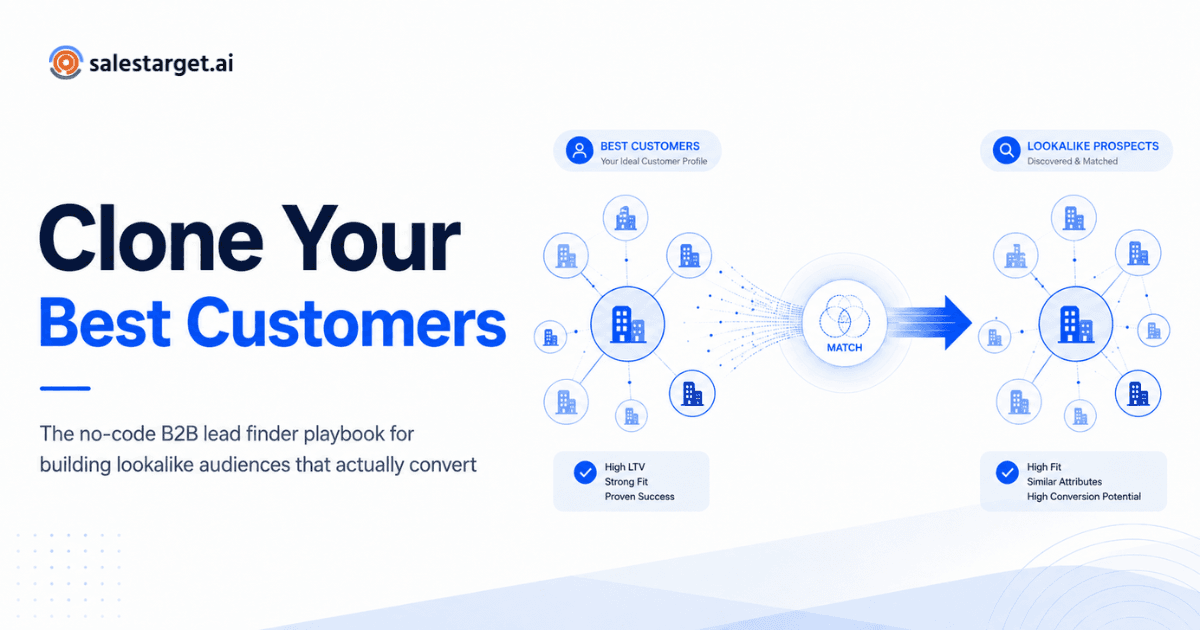
Every B2B company wants more deals, but reaching out to random contacts rarely brings strong results. The fastest way to grow pipeline is to clone the customers who already bring the highest value, stay loyal, and expand over time. When you analyze these successful accounts, you find clear patterns in company size, industry, and software tools.
You do not need an entire data science team or an in-house b2b prospect-verification analyst to find these winning traits. By turning your customer wins into an Ideal Customer Profile and pairing it with a https://salestarget.ai/lead-explorer ">b2b lead finder, you can find matching accounts, connect with real buyers, and keep your contact records clean and ready for outreach.
Start With Your Most Successful Accounts
Many sales teams make the mistake of casting a wide net across a broad market. That approach ignores valuable clues already inside your sales records. A select group of accounts purchased quickly, renewed their agreements, and expanded their usage. Those accounts show what a great fit looks like in real life.
When you review high-value accounts, shared traits stand out across industries, team sizes, budgets, regions, tools, job roles, and growth signals. You do not need to track every small detail. The goal is to isolate the few traits that repeat again and again.
This is what separates a true lookalike audience from a general target market. A target market is just a broad category. A lookalike audience is a focused group of companies that share proven traits with your happiest customers.
Define What Makes a Customer the Best Fit
Do not upload every past buyer into your audience seed list. That waters down your data with weak fits. Segment your list before you search for new accounts.
Look for accounts that show:
- Highest total contract value
- Best customer lifetime value
- Strong account renewals year after year
- Fast account growth and seat additions
- Short sales cycles from initial meeting to signed deal
- High daily software adoption and active usage
- Satisfied teams willing to act as references
For example, if your company serves hundreds of customers, focus on the top accounts that generate the strongest revenue and retention. This gives you a tight group that reveals real patterns without guesswork.
Identify Shared Customer Characteristics
After selecting your top accounts, look for traits that repeat across the group. A simple table helps you spot patterns without sorting through endless rows in a messy spreadsheet.
| Attribute | What to Look For | Why It Matters |
|---|---|---|
| Industry and sub-field | Common business categories across your best accounts | Shows a proven market with a real need |
| Company size | Employee range and revenue level | Matches your product tier and pricing |
| Tech stack | Software your product connects with or replaces | Leads to faster setup and longer retention |
| Buyer role | Job titles of internal champions | Directs outreach to people who sign contracts |
| Trigger event | New funding, team hiring, or leader changes | Highlights active buying windows |
A few strong repeating traits are far more helpful than many weak connections. A clear profile such as a growing software firm with a mid-sized team that uses cloud tools and has an operations leader is simple to prospect. A broad label like general business is not.
Turn Patterns Into an Ideal Customer Profile
An Ideal Customer Profile outlines the exact type of company most likely to purchase and succeed. A b2b lead finder helps you locate real companies and buyers that fit that description. The profile is your blueprint, while the search tool helps you fill that blueprint at scale.
A solid customer profile outlines:
- Target industries and sectors
- Company size and revenue tier
- Region and primary language
- Seniority levels and departments on the buying team
- Key tools your solution connects to or upgrades
- Core business pains your product solves
Keep your profile brief and easy to read. If your sales reps cannot explain it quickly, prospecting will drift toward random accounts that happen to reply.
For more details on turning a profile into a ready list, read this guide on how to build custom B2B lead lists with direct contact details.
Find Matching Companies With a B2B Lead Finder
A b2b lead finder lets you search a large business database using the exact traits from your customer profile. Instead of manual search tabs or buying outdated lists, you filter directly for accounts that match your lookalike criteria.
Modern sales search tools allow you to filter by:
- Industry and sub-category
- Employee size and company revenue
- Office location and headquarters
- Job title, department, and role level
- Current tools and platform integrations
- Recent growth and hiring trends
A good search platform connects account filters with verified people data so you can move from broad company matches to real people in a smooth workflow. To see this in action, this https://salestarget.ai/blogs/b2b-lead-generation-platforms-with-crm">B2B lead discovery and prospecting platform shows the entire search and export process. Great prospecting tools make lead discovery feel like pinpoint targeting instead of guesswork.
Pinpoint the Right Decision-Makers
Finding matching companies is only part of the task. Two companies in the same industry may look identical from the outside, but your deal will stall if you pitch the wrong person.
Inside each target account, pinpoint the roles that help move a deal forward:
- Leaders who sign and approve agreements
- Budget owners who hold the funds
- Internal advocates who test and suggest tools
- Team leads who will use the product daily
- Technical peers who review implementation
Targeting companies without targeting the right buyers leads to lists that look nice but fail to generate sales meetings. An intelligent search tool that links buyer roles to job titles helps you start conversations that lead to deals.
Verify Prospect Data Like a B2B Prospect-Verification Analyst
This stage is where many outbound campaigns succeed or fail. Even the best list of target accounts is useless if your messages bounce or reach obsolete inboxes. This is the exact reason companies rely on a skilled b2b prospect-verification analyst to inspect and protect contact lists.
A reliable b2b prospect-verification analyst checks for critical data flaws such as:
- Dead or inactive email addresses
- Old contact details from job turnover
- Duplicate entries across sales tools
- Shared inboxes like info or support addresses
- Outdated job titles and departments
- Risky catch-all domains and spam traps
- Recent date of verification for each record
Sending emails to unverified leads damages your domain health and hurts your inbox placement. The official guidelines in the M3AAWG Sender Best Common Practices show that keeping bounce and complaint rates minimal is essential for reaching the inbox.
You can operate with the accuracy of an expert b2b prospect-verification analyst by using tools built for automated verification. A platform that verifies emails, phone numbers, and job titles in real time turns an unvetted list into an outreach engine that protects your sender reputation.
Find More Prospects Like Your Best Customers
Build targeted B2B prospect lists from verified company and contact data, then validate the records before they reach your outreach workflow.
https://salestarget.ai/lead-explorer/verified-contact-data">→ Explore Verified B2B Contact Data
Run the Workflow Without an In-House Analyst
You do not need to hire an outside agency or an expensive b2b prospect-verification analyst to run this process. The main work starts in your billing system or CRM. Any sales leader, revenue manager, or founder can pull a list of top customers, map shared traits in a sheet, and outline a profile in a single afternoon.
Next, your lead search tool finds matching companies across millions of records, while modern verification features automate the checks that a b2b prospect-verification analyst would perform by hand. After your verified records are clean, you can import them into your outreach system or CRM so your entire team works from the same reliable data.
Common Lookalike Mistakes to Avoid
- Using all past buyers as your reference group instead of just the best fits
- Creating a customer profile based on opinions instead of observed facts
- Making your filters so strict that only a handful of accounts qualify
- Searching for companies without mapping the decision-makers inside them
- Skipping data verification and wondering why reply rates stay low
- Leaving your profile unchanged as your product and market evolve over time
Conclusion: Build a Sustainable Sales Pipeline
Building a high-performing B2B lookalike audience does not require complicated data modeling. By focusing on the accounts that already gain immense value from your solution, you can uncover clear buying patterns that guide your entire outbound strategy. When you pair an Ideal Customer Profile with reliable search filters and the precision of a b2b prospect-verification analyst, your team spends less time guessing and more time talking to real buyers.
Review your top accounts on a regular schedule. New closed deals, contract renewals, and customer growth will continue to refine what your best buyers look like as your business grows.